
If you scroll down to the bottom of your Blogger blog you'll see the following link - Subscribe to:Posts (Atom). If people were to click on the link they could add the address to their newsreader to subscribe.
If you look at the sidebar of my blog you'll notice a nice little orange icon with a link Subscribe in a Reader. What I've done in this blog is to set up my feed with Feedburner. It's totally free and quite easy, especially now that Google has bought Feedburner.
Once you've registered at Feedburner:
- Type your blog address or feed address in the box where it says Burn a feed right this instant and click on the next button.

- Feedburner will confirm the feed. In this example I am adding the library blog's feeds. It actually displays 2 feeds Atom and RSS and asks me to choose. It doesn't matter which format you choose. Click in the circle next to one of them and click on the next button.

- You'll now be asked to give a title for your feed and to choose your Feedburner feed address. Then click on the Activate Feed button.

- You can set up stats in the next step but let's click on the link to go directly to Feed management.


Promoting your FeedBurner feed on your Blogger site (thanks to Feedburner for)
- Click on the Publicize tab.
- Click Chicklet Chooser. The form shown below contains options that link to your FeedBurner feed.
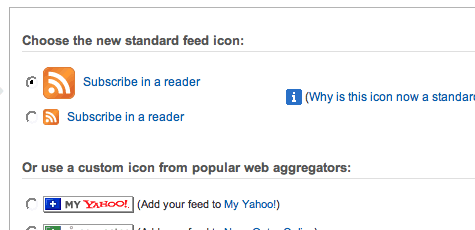
- Click the radio button next to the button you want to display on your site. eg Subscribe in a Reader
- Click the drop-down and select "Blogger" to add the chicklet as a Blogger widget and click the Go button.
- .

- Blogger will open in a new window. Follow the prompts there to continue to add the new widget
- .

Feedburner is fantastic. I can read the stats for the number of subscribers to my blog. I can create email signatures to advertise my blog. If you've ever received an email from me you may have noticed the scrolling signature.
Anyhoo, give it a go.
Cheers, webgurl


