
I tried using the search tools suggested into the instructions to search for RSS feeds but had mixed results. In the past I've used Technorati, Blogger Blog Search and Google with great results. I also use bloggers blogrolls a lot. If I find a blog of interest I check to see what they're reading. I often find cool blogs this way.
Here's some of the new tools I tried.
Feedster
I tried searching libraries and public in Feedster and found only one article in the first page that concerned public libraries. I even tried adding quotes but didn't find anything useful. Big thumbs down.
Topix
Topix gave me some better results however I had to search with quotes to get more valid results.
I find that if you get offered a link to related tags it's best to click on this for better results.
Cheers, webgurl
Tuesday, October 9, 2007
Week 4 #9 - RSS & newsreaders - searching for feeds

Week 4 #8 - Advertising your feed
If you scroll down to the bottom of your Blogger blog you'll see the following link - Subscribe to:Posts (Atom). If people were to click on the link they could add the address to their newsreader to subscribe.
If you look at the sidebar of my blog you'll notice a nice little orange icon with a link Subscribe in a Reader. What I've done in this blog is to set up my feed with Feedburner. It's totally free and quite easy, especially now that Google has bought Feedburner.
Once you've registered at Feedburner:
- Type your blog address or feed address in the box where it says Burn a feed right this instant and click on the next button.

- Feedburner will confirm the feed. In this example I am adding the library blog's feeds. It actually displays 2 feeds Atom and RSS and asks me to choose. It doesn't matter which format you choose. Click in the circle next to one of them and click on the next button.

- You'll now be asked to give a title for your feed and to choose your Feedburner feed address. Then click on the Activate Feed button.

- You can set up stats in the next step but let's click on the link to go directly to Feed management.


Promoting your FeedBurner feed on your Blogger site (thanks to Feedburner for)
- Click on the Publicize tab.
- Click Chicklet Chooser. The form shown below contains options that link to your FeedBurner feed.
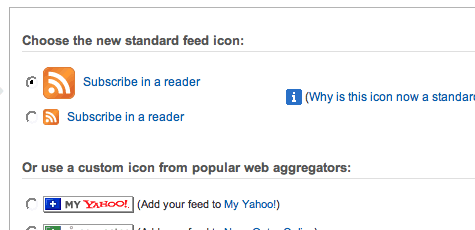
- Click the radio button next to the button you want to display on your site. eg Subscribe in a Reader
- Click the drop-down and select "Blogger" to add the chicklet as a Blogger widget and click the Go button.
- .

- Blogger will open in a new window. Follow the prompts there to continue to add the new widget
- .

Feedburner is fantastic. I can read the stats for the number of subscribers to my blog. I can create email signatures to advertise my blog. If you've ever received an email from me you may have noticed the scrolling signature.
Anyhoo, give it a go.
Cheers, webgurl
Tuesday, October 2, 2007
Week 4 #8 RSS & News Readers
Well I already had a Bloglines account that I only used occasionally. I actually have access to about five newsreaders; Bloglines, My Yahoo, Google Reader, Mozilla Firefox and Mozilla Thunderbird. Mostly I use Firefox as I always have this open.
After remembering the login, no mean feat I must say, I set about adding a few more feeds. I actually organised them as I went by putting them in folders. I used the search box in the top right pane to search for feeds on particular subjects of interest; library, web design and technology etc.
I followed the instructions for sharing the blogroll (or list of feeds) only to find that these instructions are out of date.
To adjust your settings to share your Blogroll:
- Click on the Account link at the top right.
- Click on the Blog settings link at the right.
- Select Yes, publish my Blogroll.
- Click the Save changes button.
- Click on the share link at the bottom left.
- You'll find the link to the public version of your Blogroll at the bottom right.
If you want to add my feed to your Bloglines blogroll the address is http://feeds.feedburner.com/23squared
Cheers, webgurl


